本来是打算元旦不打ctf的,奈何小登找我帮忙做一下,遂出手了,结果越做越开心说是(),然后就干起来了 不得不说这次题目还挺好(指的是做起来很简单,基本都能梭),也就happyemoji难一点,其他的就有点懒得写了)
HappyEmoji
知识点省流
四进制 图像识别
WP
题目给了一个gif图,里面是超多微笑表情的旋转gif,我先将他们分帧切分后,发现里面一共存在四种转速,分别为不转,3帧一圈、7帧一圈、14帧一圈,根据描述一串为一个字符,并且我发现每四行为一组,第一行都是不转或者14帧一圈的组合,断定这是一个四进制数,然后开头为0或者1
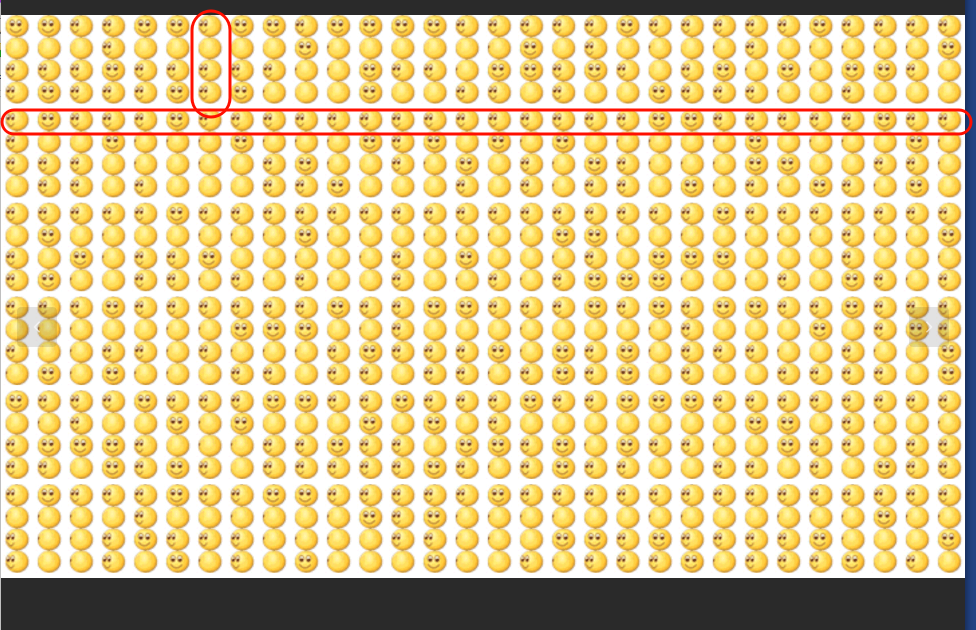
接下来就是如何去识别这些四进制数,我用的方法是像素识别,因为本质上每个emoji都是一样的,只是cp了而已,所以当转速不同时,不同帧的相同位置像素就可能出现不同,通过这个思想,我对图片进行切割,将每个emoji单独切出来,然后查找能够做区分的某一帧某个位置像素,借此去识别数值,最终的脚本如下:
1from PIL import Image, ImageSequence
2import math
3
4# ================= 配置区 =================
5GIF_PATH = 'flag.gif'
6FRAME_INDEXES = [3, 34, 65, 96] # 从 1 开始计数
7
8BLOCK_H = 42
9BLOCK_W = 61
10GAP_H = 10
11
12TARGET_Y = 15
13TARGET_X = 34
14
15SHIFT_X = 5 # 向右平移 5 像素
16# =========================================
17
18COLOR_MAP = {
19 (191, 175, 143): 0,
20 (255, 223, 127): 2,
21 (255, 239, 111): 1
22}
23
24STRIDE_H = BLOCK_H * 4 + GAP_H
25
26
27def shift_image_right(img, shift):
28 """整张图向右平移 shift 像素"""
29 w, h = img.size
30 new_img = Image.new('RGB', (w, h), (0, 0, 0))
31 new_img.paste(img, (shift, 0))
32 return new_img
33
34
35def decode_image(img):
36 width, height = img.size
37 pixels = img.load()
38
39 cols = math.ceil(width / BLOCK_W)
40 groups = math.ceil(height / STRIDE_H)
41
42 decoded_chars = []
43
44 for group in range(groups): # 从上到下
45 for col in range(cols): # 从左到右
46 digits = []
47
48 for i in range(4):
49 base_x = col * BLOCK_W
50 base_y = group * STRIDE_H + i * BLOCK_H
51
52 x = base_x + TARGET_X
53 y = base_y + TARGET_Y
54
55 if x >= width or y >= height:
56 value = 3
57 else:
58 pixel = pixels[x, y]
59 value = COLOR_MAP.get(pixel, 3)
60
61 digits.append(str(value))
62
63 base4 = ''.join(digits)
64
65 if any(c not in '0123' for c in base4):
66 decoded_chars.append('?')
67 else:
68 decoded_chars.append(chr(int(base4, 4)))
69
70 return ''.join(decoded_chars)
71
72
73# ================= 主流程 =================
74gif = Image.open(GIF_PATH)
75
76final_result = []
77
78print('==== GIF 帧解码 ====')
79
80for idx in FRAME_INDEXES:
81 frame_no = idx - 1 # 转为 0-based
82
83 gif.seek(frame_no)
84 frame = gif.convert('RGB')
85
86 # 右移 5 像素
87 shifted = shift_image_right(frame, SHIFT_X)
88
89 decoded = decode_image(shifted)
90
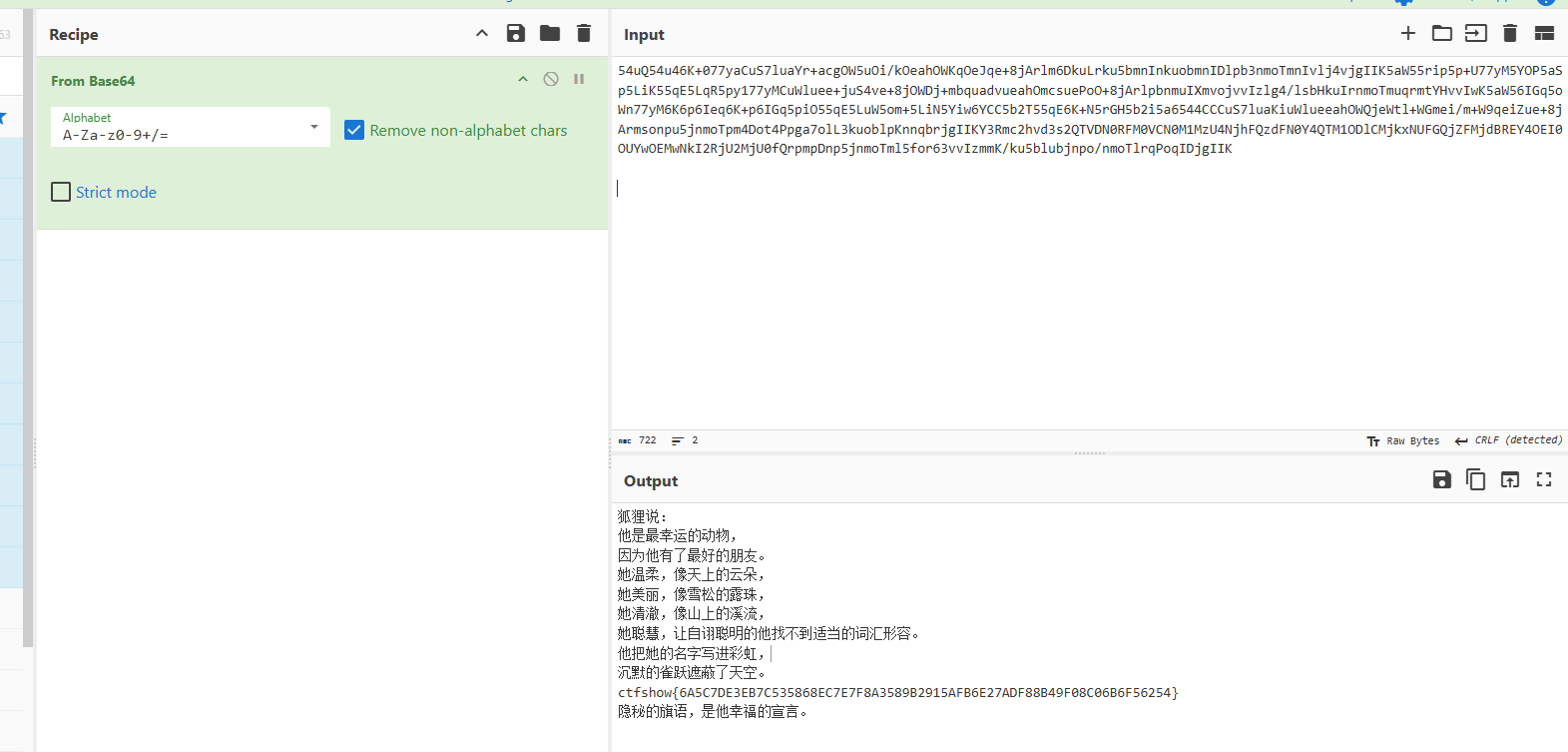
91 print(f'\n帧 {idx} 解码结果:')
92 print(decoded)
93
94 final_result.append(decoded)
95
96print('\n==== 最终拼接结果 ====')
97print(''.join(final_result))最终能识别出一串base64字符串,解base得到flag

本来是打算元旦不打ctf的,奈何小登找我帮忙做一下,遂出手了,结果越做越开心说是(),然后就干起来了 不得不说这次题目还挺好(指的是做起来很简单,基本都能梭),也就happyemoji难一点,其他的就有点懒得写了)
HappyEmoji
知识点省流
四进制 图像识别
WP
题目给了一个gif图,里面是超多微笑表情的旋转gif,我先将他们分帧切分后,发现里面一共存在四种转速,分别为不转,3帧一圈、7帧一圈、14帧一圈,根据描述一串为一个字符,并且我发现每四行为一组,第一行都是不转或者14帧一圈的组合,断定这是一个四进制数,然后开头为0或者1

接下来就是如何去识别这些四进制数,我用的方法是像素识别,因为本质上每个emoji都是一样的,只是cp了而已,所以当转速不同时,不同帧的相同位置像素就可能出现不同,通过这个思想,我对图片进行切割,将每个emoji单独切出来,然后查找能够做区分的某一帧某个位置像素,借此去识别数值,最终的脚本如下:
1from PIL import Image, ImageSequence
2import math
3
4# ================= 配置区 =================
5GIF_PATH = 'flag.gif'
6FRAME_INDEXES = [3, 34, 65, 96] # 从 1 开始计数
7
8BLOCK_H = 42
9BLOCK_W = 61
10GAP_H = 10
11
12TARGET_Y = 15
13TARGET_X = 34
14
15SHIFT_X = 5 # 向右平移 5 像素
16# =========================================
17
18COLOR_MAP = {
19 (191, 175, 143): 0,
20 (255, 223, 127): 2,
21 (255, 239, 111): 1
22}
23
24STRIDE_H = BLOCK_H * 4 + GAP_H
25
26
27def shift_image_right(img, shift):
28 """整张图向右平移 shift 像素"""
29 w, h = img.size
30 new_img = Image.new('RGB', (w, h), (0, 0, 0))
31 new_img.paste(img, (shift, 0))
32 return new_img
33
34
35def decode_image(img):
36 width, height = img.size
37 pixels = img.load()
38
39 cols = math.ceil(width / BLOCK_W)
40 groups = math.ceil(height / STRIDE_H)
41
42 decoded_chars = []
43
44 for group in range(groups): # 从上到下
45 for col in range(cols): # 从左到右
46 digits = []
47
48 for i in range(4):
49 base_x = col * BLOCK_W
50 base_y = group * STRIDE_H + i * BLOCK_H
51
52 x = base_x + TARGET_X
53 y = base_y + TARGET_Y
54
55 if x >= width or y >= height:
56 value = 3
57 else:
58 pixel = pixels[x, y]
59 value = COLOR_MAP.get(pixel, 3)
60
61 digits.append(str(value))
62
63 base4 = ''.join(digits)
64
65 if any(c not in '0123' for c in base4):
66 decoded_chars.append('?')
67 else:
68 decoded_chars.append(chr(int(base4, 4)))
69
70 return ''.join(decoded_chars)
71
72
73# ================= 主流程 =================
74gif = Image.open(GIF_PATH)
75
76final_result = []
77
78print('==== GIF 帧解码 ====')
79
80for idx in FRAME_INDEXES:
81 frame_no = idx - 1 # 转为 0-based
82
83 gif.seek(frame_no)
84 frame = gif.convert('RGB')
85
86 # 右移 5 像素
87 shifted = shift_image_right(frame, SHIFT_X)
88
89 decoded = decode_image(shifted)
90
91 print(f'\n帧 {idx} 解码结果:')
92 print(decoded)
93
94 final_result.append(decoded)
95
96print('\n==== 最终拼接结果 ====')
97print(''.join(final_result))最终能识别出一串base64字符串,解base得到flag

本来是打算元旦不打ctf的,奈何小登找我帮忙做一下,遂出手了,结果越做越开心说是(),然后就干起来了 不得不说这次题目还挺好(指的是做起来很简单,基本都能梭)
HappyEmoji
知识点省流
四进制 图像识别
WP
题目给了一个gif图,里面是超多微笑表情的旋转gif,我先将他们分帧切分后,发现里面一共存在四种转速,分别为不转,3帧一圈、7帧一圈、14帧一圈,根据描述一串为一个字符,并且我发现每四行为一组,第一行都是不转或者14帧一圈的组合,断定这是一个四进制数,然后开头为0或者1

接下来就是如何去识别这些四进制数,我用的方法是像素识别,因为本质上每个emoji都是一样的,只是cp了而已,所以当转速不同时,不同帧的相同位置像素就可能出现不同,通过这个思想,我对图片进行切割,将每个emoji单独切出来,然后查找能够做区分的某一帧某个位置像素,借此去识别数值,最终的脚本如下:
1from PIL import Image, ImageSequence
2import math
3
4# ================= 配置区 =================
5GIF_PATH = 'flag.gif'
6FRAME_INDEXES = [3, 34, 65, 96] # 从 1 开始计数
7
8BLOCK_H = 42
9BLOCK_W = 61
10GAP_H = 10
11
12TARGET_Y = 15
13TARGET_X = 34
14
15SHIFT_X = 5 # 向右平移 5 像素
16# =========================================
17
18COLOR_MAP = {
19 (191, 175, 143): 0,
20 (255, 223, 127): 2,
21 (255, 239, 111): 1
22}
23
24STRIDE_H = BLOCK_H * 4 + GAP_H
25
26
27def shift_image_right(img, shift):
28 """整张图向右平移 shift 像素"""
29 w, h = img.size
30 new_img = Image.new('RGB', (w, h), (0, 0, 0))
31 new_img.paste(img, (shift, 0))
32 return new_img
33
34
35def decode_image(img):
36 width, height = img.size
37 pixels = img.load()
38
39 cols = math.ceil(width / BLOCK_W)
40 groups = math.ceil(height / STRIDE_H)
41
42 decoded_chars = []
43
44 for group in range(groups): # 从上到下
45 for col in range(cols): # 从左到右
46 digits = []
47
48 for i in range(4):
49 base_x = col * BLOCK_W
50 base_y = group * STRIDE_H + i * BLOCK_H
51
52 x = base_x + TARGET_X
53 y = base_y + TARGET_Y
54
55 if x >= width or y >= height:
56 value = 3
57 else:
58 pixel = pixels[x, y]
59 value = COLOR_MAP.get(pixel, 3)
60
61 digits.append(str(value))
62
63 base4 = ''.join(digits)
64
65 if any(c not in '0123' for c in base4):
66 decoded_chars.append('?')
67 else:
68 decoded_chars.append(chr(int(base4, 4)))
69
70 return ''.join(decoded_chars)
71
72
73# ================= 主流程 =================
74gif = Image.open(GIF_PATH)
75
76final_result = []
77
78print('==== GIF 帧解码 ====')
79
80for idx in FRAME_INDEXES:
81 frame_no = idx - 1 # 转为 0-based
82
83 gif.seek(frame_no)
84 frame = gif.convert('RGB')
85
86 # 右移 5 像素
87 shifted = shift_image_right(frame, SHIFT_X)
88
89 decoded = decode_image(shifted)
90
91 print(f'\n帧 {idx} 解码结果:')
92 print(decoded)
93
94 final_result.append(decoded)
95
96print('\n==== 最终拼接结果 ====')
97print(''.join(final_result))最终能识别出一串base64字符串,解base得到flag

Comments will be available soon.