NepCTF2025 - misc - WriteUp
碎碎念
这回也是第一次打nep(笑死了什么时候我能有打第二次的比赛),打之前看过去年的wp,感觉今年好像要难点? 反正一开始做的是挺牢的 但总的来说还是万变不离其宗了,这次本来只是想看看题的,打着打着又做了不少题,想歇着了)
NepBotEvent
知识点省流
变种键盘流量()
WP
题目说了是Keylogger,推断应该跟键盘流量类似
将里面的hex值提取出来,然后多次分析后发现41-42这两位就是对应的键盘hid数据,提取出来后用脚本转对应数据即可,要记得加上shift后会影响大小写
经过分析 每三行为一组数据,第一行为对应的hid数据,如果第二行相同位置的值为0则表示成功输入,如果为1则视为输入失败
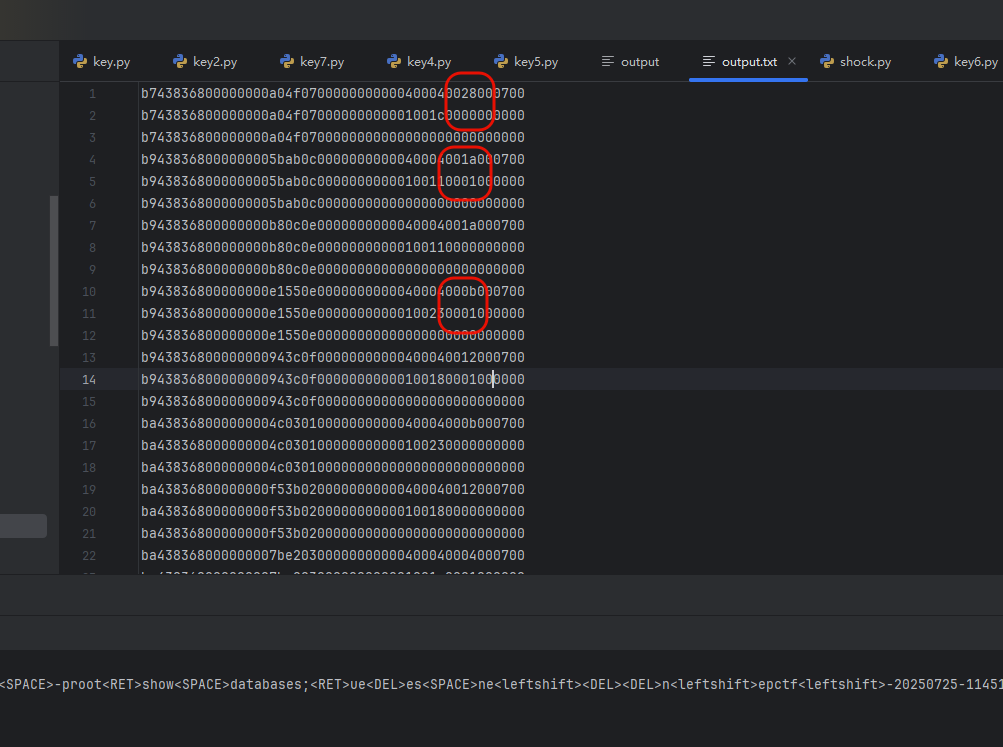
让ai搞个脚本过滤一下
 1def extract_chars(input_file, output_file):
 2    with open(input_file, 'r', encoding='utf-8') as infile, \
 3         open(output_file, 'w', encoding='utf-8') as outfile:
 4        for line in infile:
 5            if len(line) >= 42:
 6                outfile.write(line[40:42] + '\n')  # 索引从0开始,39是第40个字符
 7            else:
 8                outfile.write('\n')  # 行长度不足42,写空行
 9
10# 使用示例
11extract_chars('input.txt', 'output1.txt')
12
13
14def filter_by_next_line(input_file, output_file):
15    with open(input_file, 'r', encoding='utf-8') as f:
16        lines = [line.strip() for line in f]
17
18    result = []
19    for i in range(0, len(lines) - 1, 3):  # 每3行观察一次
20        current_line = lines[i]
21        next_line = lines[i + 1]
22        if next_line == '00':
23            result.append(current_line)
24
25    with open(output_file, 'w', encoding='utf-8') as f:
26        for item in result:
27            f.write(item + '\n')
28
29# 使用示例
30filter_by_next_line('output1.txt', 'filtered.txt')
然后再映射即可
 1# 自定义 HID 映射表(十六进制小写字符串作为键)
 2hid_keymap = {
 3    "04": "a", "05": "b", "06": "c", "07": "d", "08": "e", "09": "f", "0a": "g", "0b": "h", "0c": "i",
 4    "0d": "j", "0e": "k", "0f": "l", "10": "m", "11": "n", "12": "o", "13": "p", "14": "q", "15": "r",
 5    "16": "s", "17": "t", "18": "u", "19": "v", "1a": "w", "1b": "x", "1c": "y", "1d": "z", "1e": "1",
 6    "1f": "2", "20": "3", "21": "4", "22": "5", "23": "6", "24": "7", "25": "8", "26": "9", "27": "0",
 7    "28": "<RET>", "29": "<ESC>", "2a": "<DEL>", "2b": "\t", "2c": "<SPACE>", "2d": "-", "2e": "=",
 8    "2f": "[", "30": "]", "31": "\\", "32": "<NON>", "33": ";", "34": "'", "35": "<GA>", "36": ",",
 9    "37": ".", "38": "/", "39": "<CAP>", "3a": "<F1>", "3b": "<F2>", "3c": "<F3>", "3d": "<F4>",
10    "3e": "<F5>", "3f": "<F6>", "40": "<F7>", "41": "<F8>", "42": "<F9>", "43": "<F10>", "44": "<F11>",
11    "45": "<F12>", "46": "<PRTSC>", "47": "<SCRLK>", "48": "<PAUSE>", "49": "<INS>", "4a": "<HOME>",
12    "4b": "<PGUP>", "4c": "<DEL_FWD>", "4d": "<END>", "4e": "<PGDN>", "4f": "<RIGHT>", "50": "<LEFT>",
13    "51": "<DOWN>", "52": "<UP>", "53": "<NUMLOCK>", "54": "/", "55": "*", "56": "-", "57": "+",
14    "58": "<ENTER>", "59": "1", "5a": "2", "5b": "3", "5c": "4", "5d": "5", "5e": "6", "5f": "7",
15    "60": "8", "61": "9", "62": "0", "63": ".", "64": "<NONUS_BACK>", "65": "<APP>", "66": "<POWER>",
16    "67": "=", "68": "<F13>", "69": "<F14>", "6a": "<F15>", "6b": "<F16>", "6c": "<F17>", "6d": "<F18>",
17    "6e": "<F19>", "6f": "<F20>", "70": "<F21>", "71": "<F22>", "72": "<F23>", "73": "<F24>","e1":"<leftshift>","e5":"<rightshift>",
18}
19
20# 加载 USB HID 数据文件
21input_file = "filtered.txt"  # 替换为你的实际路径
22with open(input_file, "r") as f:
23    lines = f.read().splitlines()
24
25# 解析数据并还原按键
26keystrokes = []
27for line in lines:
28    hex_code = line.lower()
29    key = hid_keymap.get(hex_code, '')
30    keystrokes.append(key)
31
32# 输出完整的按键还原结果(包括控制符号)
33reconstructed_text = ''.join(keystrokes)
34print(reconstructed_text)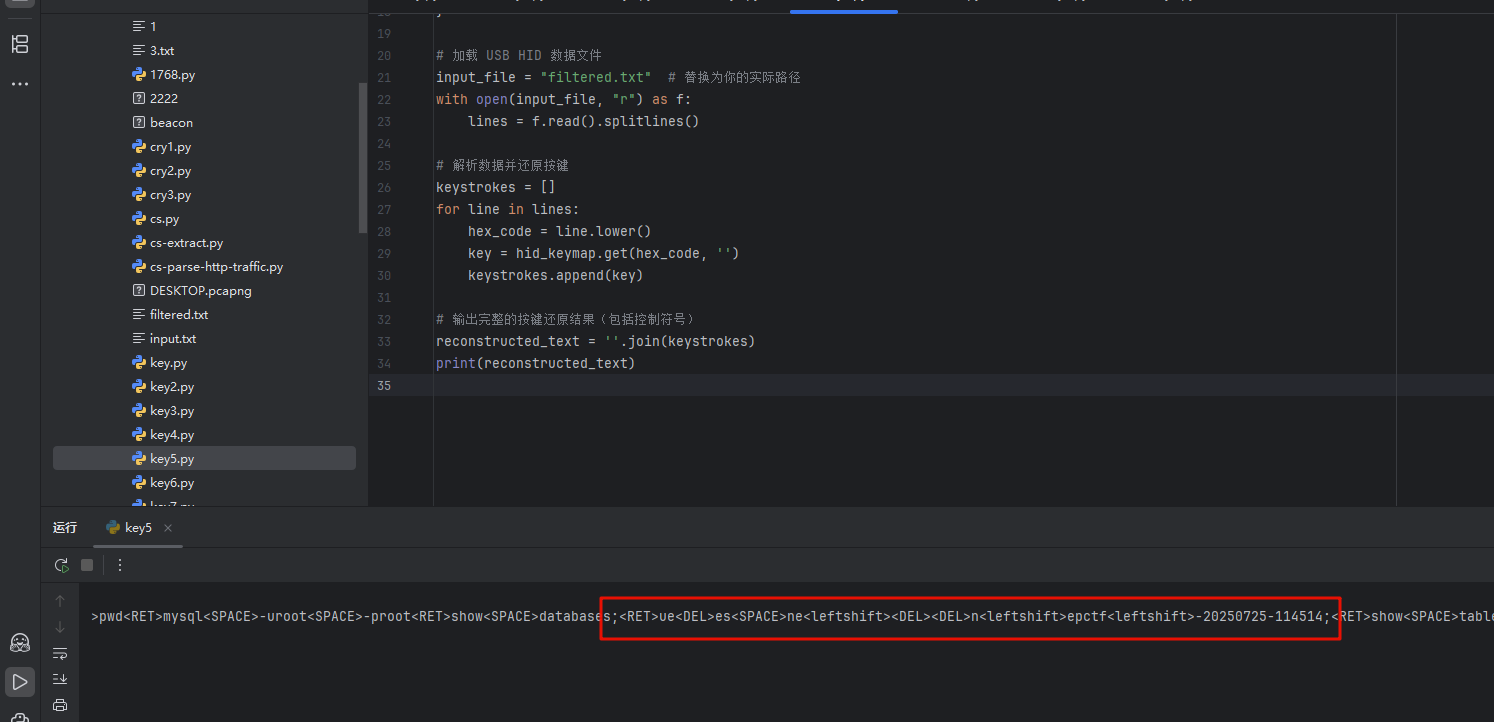
SpeedMino
知识点省流
俄罗斯高手 脚本小子
WP
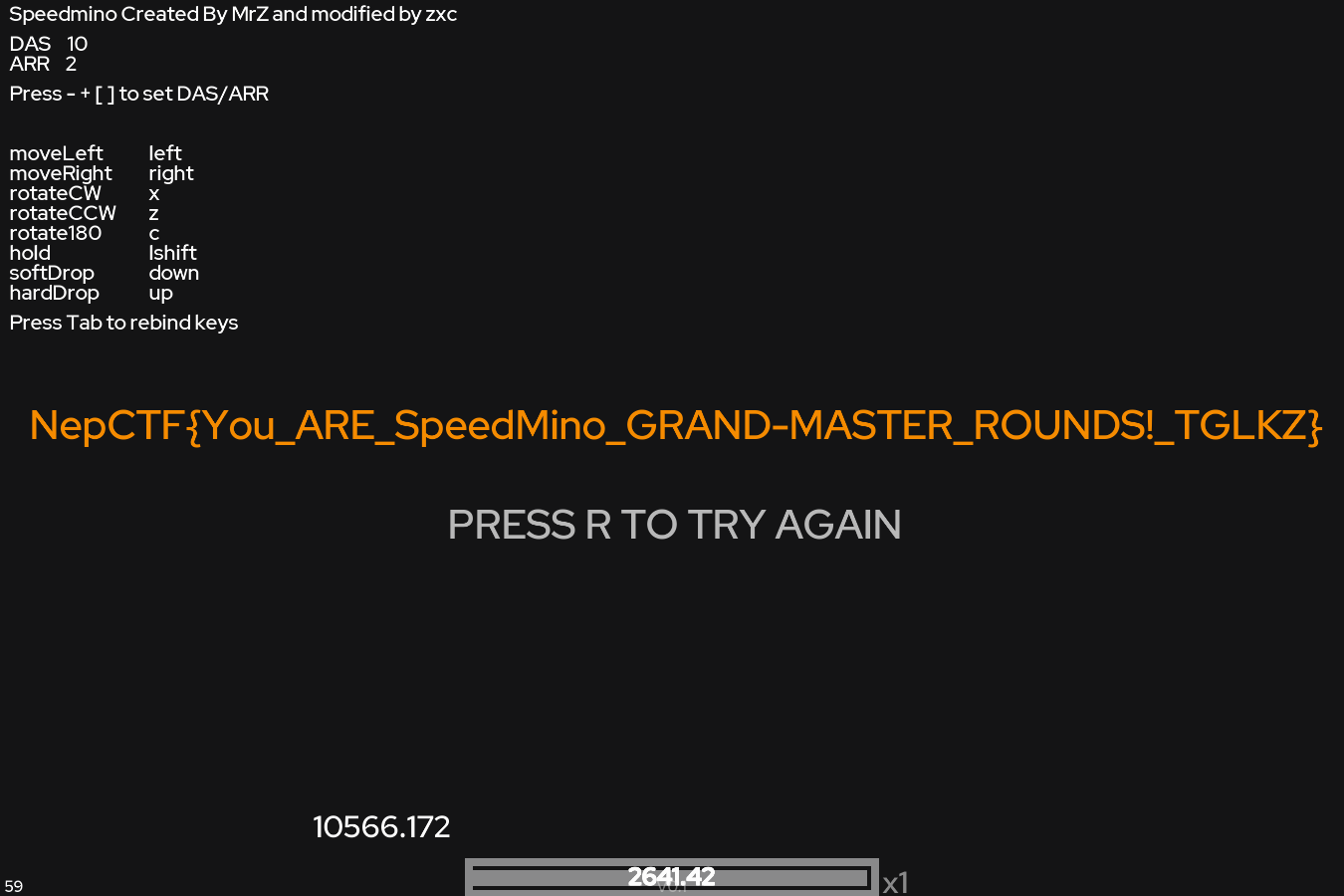
俄罗斯方块,题目说玩到2600分给flag
试了几次有点费劲,但是发现只要一直翻转方块就不会落地
所以下个连点脚本让他慢慢攒分
 1import keyboard
 2import time
 3
 4print("立即开始连点 X 键,按 Ctrl+C 或 ESC 停止。")
 5
 6try:
 7    while True:
 8        keyboard.press_and_release('x')
 9        time.sleep(0.1)
10        if keyboard.is_pressed('esc'):
11            print("已停止")
12            break
13except KeyboardInterrupt:
14    print("\n用户终止")
15x
跑了3小时就出了
客服小美
知识点省流
取证分析+cs流量解密
WP
内存取证和流量取证
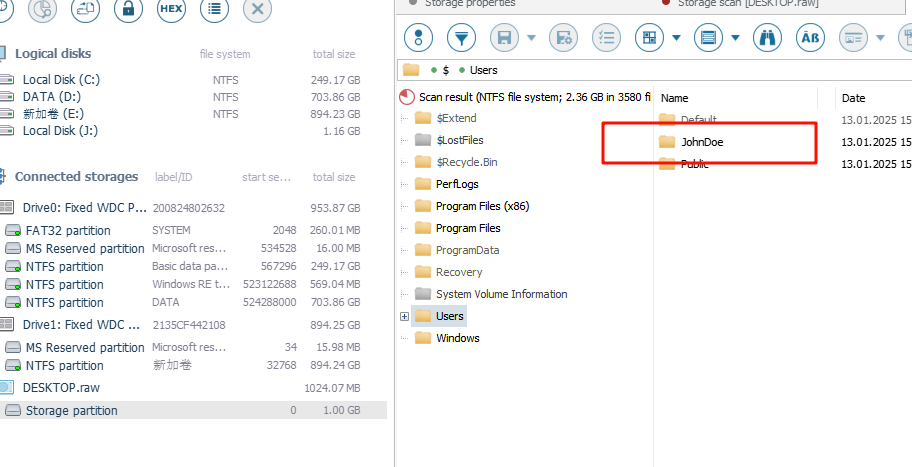
用户名很简单,用ufs打开内存镜像找到盘里的用户即可——JohnDoe
ip和端口可以直接在流量包中找到 确定的过程是在桌面上发现了一个exe文件,导出来丢给沙箱会发现是个cs程序,而流量包也符合cs的特征,所以这段流量就是被控机再给攻击者的木马地址进行通信,dst就是木马ip和端口
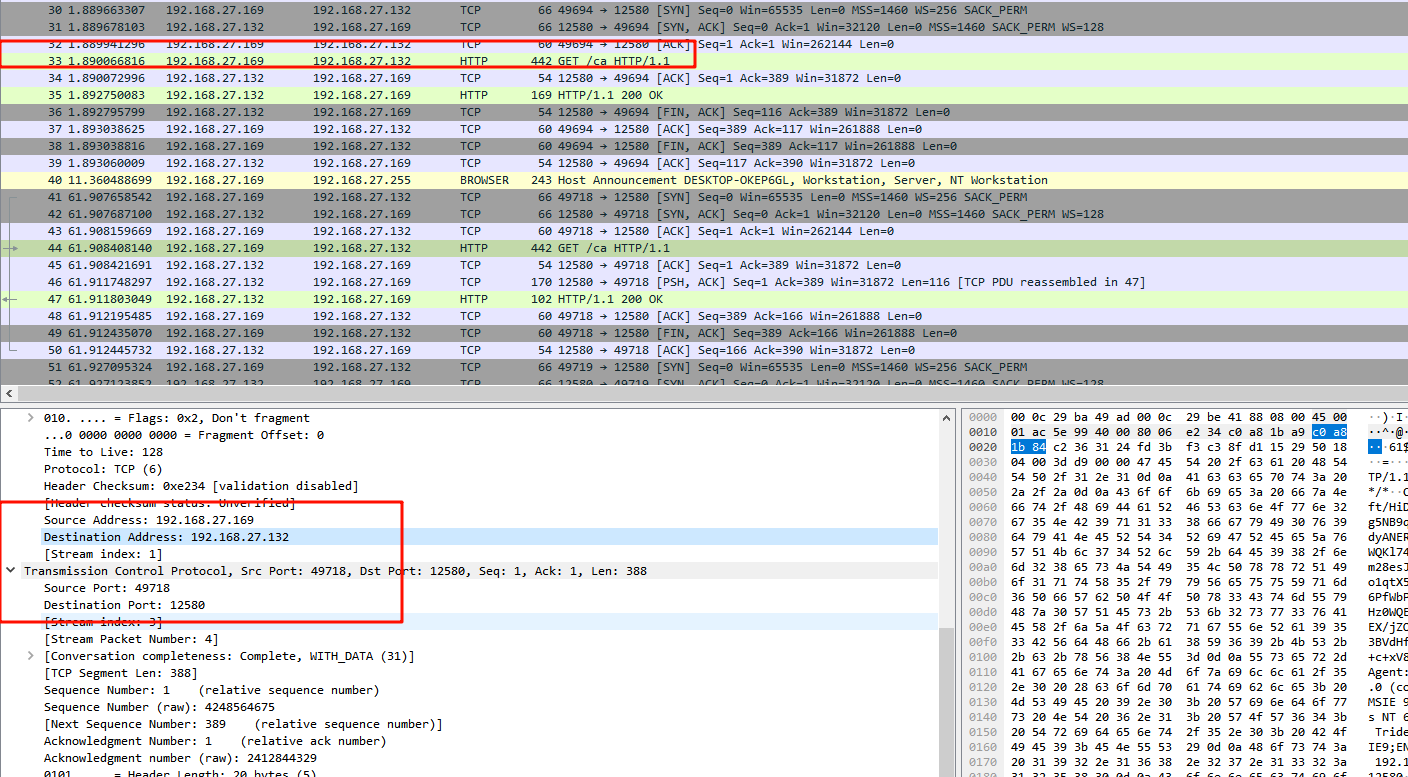
敏感信息则需要解密cs流量,常规的解公钥爆破私钥的方法尝试后无果,n分解不了
搜索一下找到了这个文章 https://www.secrss.com/articles/35756
用vol3提取恶意程序的进程转储,然后用里面提到的cs-extract脚本直接提取hmac key和aes key后
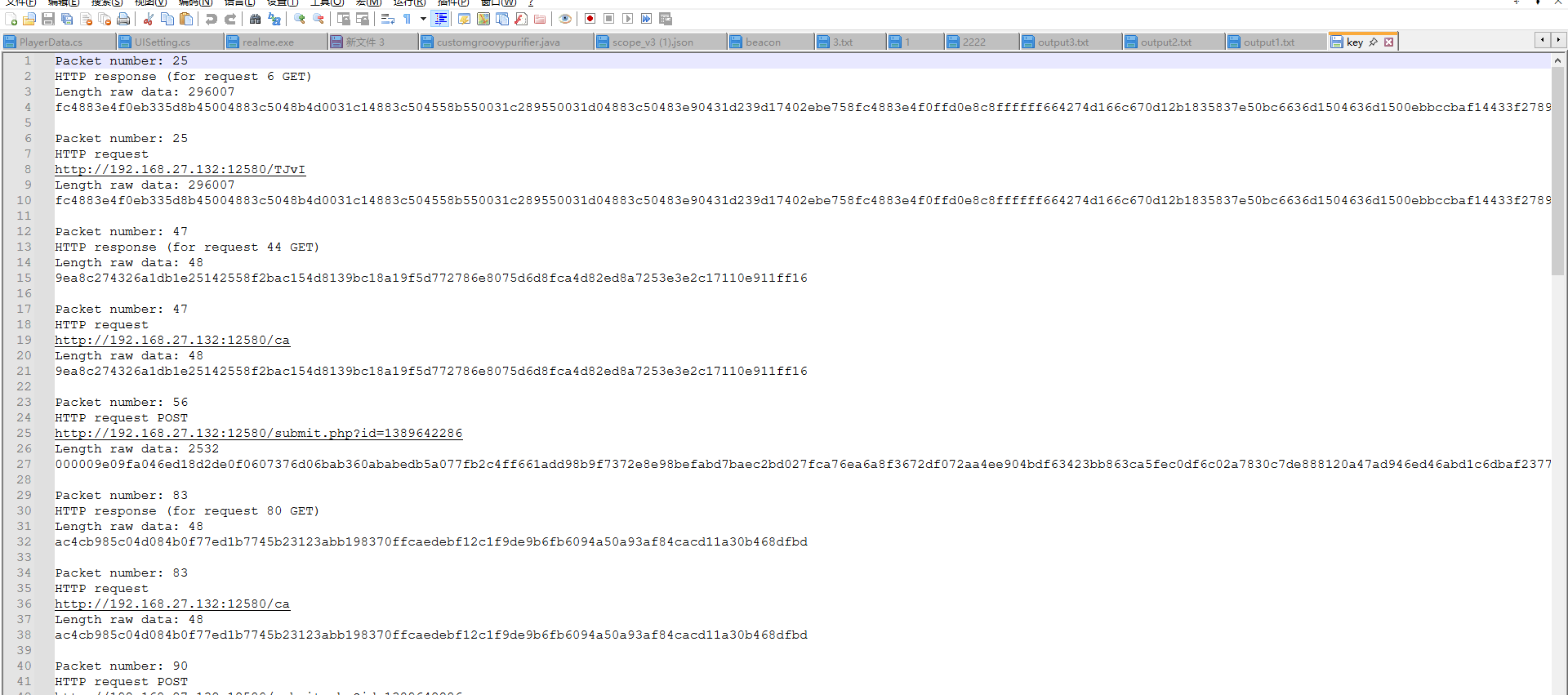

https://goodlunatic.github.io/posts/f002407/#%E9%A2%98%E7%9B%AE%E5%90%8D%E7%A7%B0-cscs 我直接用lunatic师傅的cscs这题的脚本解的数据(用文章的那个解析脚本会报错不知道为什么 key是没问题的)
 1import hmac
 2import binascii
 3import base64
 4import hexdump
 5from Crypto.Cipher import AES
 6
 7def decrypt(encrypted_data, iv_bytes, signature, shared_key, hmac_key):
 8    if hmac.new(hmac_key, encrypted_data, digestmod="sha256").digest()[:16] != signature:
 9        print("message authentication failed")
10        return
11    cipher = AES.new(shared_key, AES.MODE_CBC, iv_bytes)
12    return cipher.decrypt(encrypted_data)
13
14if __name__ == "__main__":
15    SHARED_KEY = binascii.unhexlify("9fe14473479a283821241e2af78017e8")
16    HMAC_KEY = binascii.unhexlify("1e3d54f1b9f0e106773a59b7c379a89d")
17    encrypt_datas = ["00000040efeda3e57f7d7fd589d11640ea0f9a4fe6bc91332723ffc5f43f78b37c21cc7485c44d6c8eb6af74fc7044046059c76519e493e351c9f631d6785d5c07eae9e3","000001602a99f7cc51face35199e8b1a4a5616e0301591b6f1f48b1d000149cb83d6a81e9659849a52c4f50a8629b0dfb7c036df406b44d449e40fe18df3594721e1f5849662271c1ea18b18c8eb58af5ee2c3a784852dd1c4a5c699f9518d2e2fc70d756cd68361ac794eed4eae6b062be6c31651caf93954f2a89b10e25b1fd9757ec17ee8b97038c4babb73c4f21688f5d235797844c2c9c288fac3fd2bd9cf5373956389b7e5232e35b6f268f9d67ba54f3e7e1606d4cb4020d5f480c6e5f4409b8d87e0443ae0bcfe93d286291ba6bfd0c7f37593581d90bb4ab7cfb065b4421a727f120fb491c2dc01797e38996dfc123fb120c5ed312577cc917d8a435b73c25b6d29ef0bad595100256c9aa5571e5c0ce0a8ea2c173ca1fae577fa924506b75b86522052f019d6843d74dc6fbdf2219b77e020a049c4e77df3658c80bcb703f8f878ff2f70c5c69d0cf6f4efb5a755ba854dfa5777a23989286770da6e0444d0","000000d0c72ef8b74a7d8acc332695b62448280f9a4eaa12457de4adcad279b0563f2d4cb0707f7e2853c45acf28a365d905cf8ca421d557bd7655cbd50aafbdbe5f3f570c9c3d876d0c21b661ca5c46e09f987f7e1263f6d33c34db28a2fd342fe48e5801d1a97fb88e00f0c648ec889f6b72d71edd2eed5affd32bc8d51e27fcc148d16823c1bc235b0e16d9d477bd0b4582941db373e171cce78b10c869eb987baf3fd9f879b236be6f3af43b7742f6241dfe02ab696c96f1779d0003d6b2720d1c93890e75fcce939f1c8e0922ce5044bc3a","00000100f24f15cd6f33c36e70ca228d10babfac1cf6bfbb9b6923a7828c9ed30b76d3ce1cb3d8f97c358bf90004e771ac646b1b996fd248ac8f0b460e0a36950dffcde04f3bae831982b528393f3a3c771310ba0c0bb7418ba5e8734a6bd37bc8a51cc0683c0904e0f404180e4c4c34720a3e5d6767c435f1746e6b93a13a2ecdc8074089e684b90748fc1a7e24e66bd637673437d9e24a37ce6f584b478e2f0485f3c05414dd4c35eb9ecfed8d4fbdab54db4233258f4fea6ed515a1030feeb184db94a4841236b491d2f7379e10f52d50ae573cd6f4504aa9750da273fa65c2a9eaf9b9bb014cafc53a9e9f0042bfcd5d24fc1b29173fd3308ff08d30b2a7d42132d4"]
18    for encrypt_data in encrypt_datas:
19        # encrypt_data = base64.b64decode(encrypt_data)
20        encrypt_data = bytes.fromhex(encrypt_data)
21        encrypt_data_length = int.from_bytes(encrypt_data[:4], byteorder='big', signed=False)
22        encrypt_data_l = encrypt_data[4:]
23        data1 = encrypt_data_l[:encrypt_data_length-16]
24        signature = encrypt_data_l[encrypt_data_length-16:]
25        iv_bytes = b"abcdefghijklmnop"
26
27        dec = decrypt(data1, iv_bytes, signature, SHARED_KEY, HMAC_KEY)
28        print(f"{'='*80}")
29        print("[+] counter: {}".format(int.from_bytes(dec[:4], byteorder='big', signed=False)))
30        print("[+] 任务返回长度: {}".format(int.from_bytes(dec[4:8], byteorder='big', signed=False)))
31        print("[+] 任务输出类型: {}".format(int.from_bytes(dec[8:12], byteorder='big', signed=False)))
32        output = dec[12:int.from_bytes(dec[4:8], byteorder='big', signed=False)].decode('gbk',errors='ignore')
33        print(hexdump.hexdump(dec))
34        print(output)
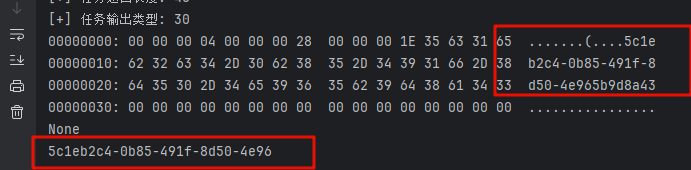
最后得到了敏感信息
MoewBle喵泡
知识点省流
玩游戏就对了+轻逆向(熟悉游戏的也可以直接猜到指令)
WP
玩游戏玩完可以得到几乎全部flag 但少了一段
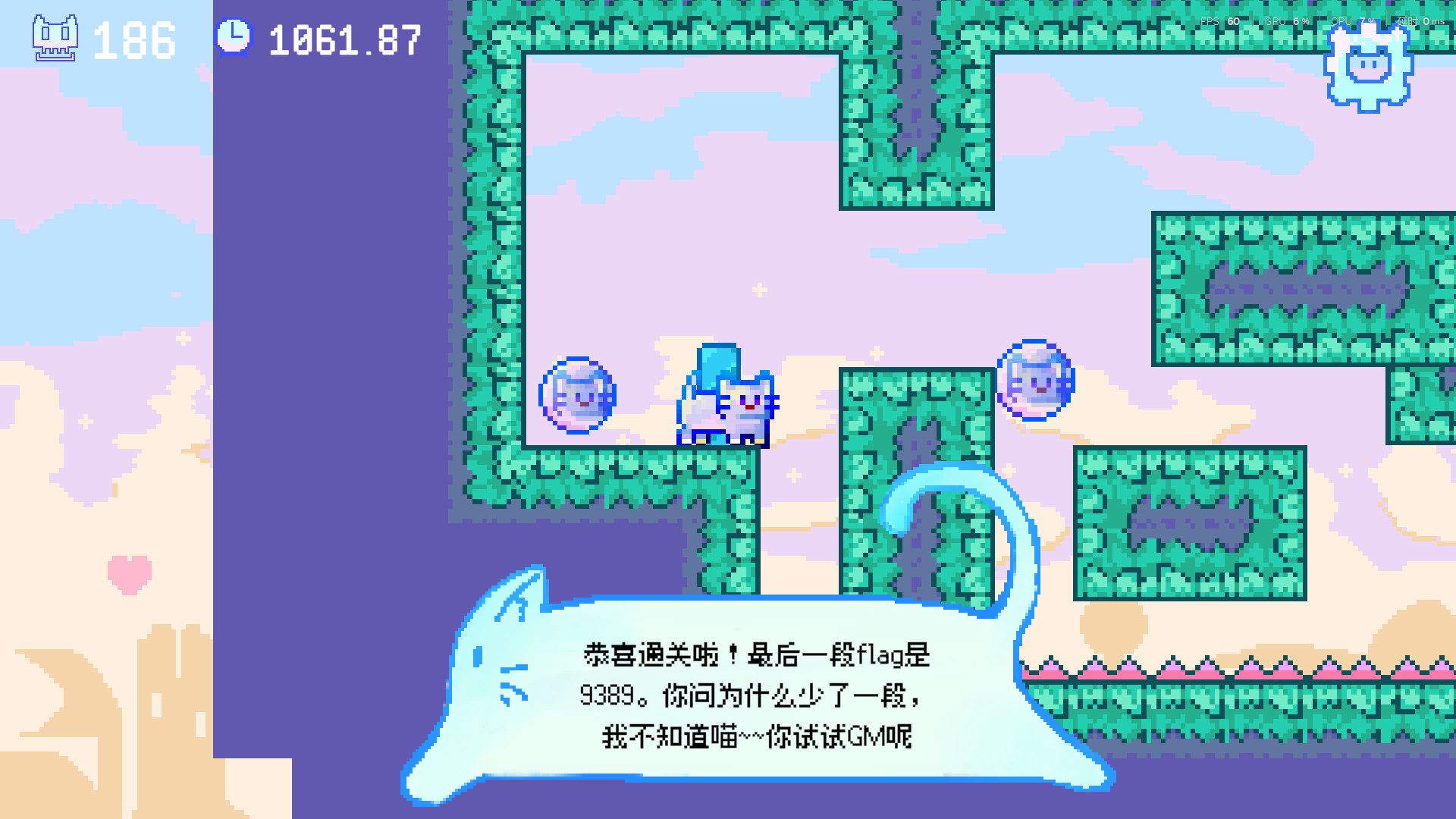
找到后我反过来爆搜flag片段发现flag明文存储在了文件中
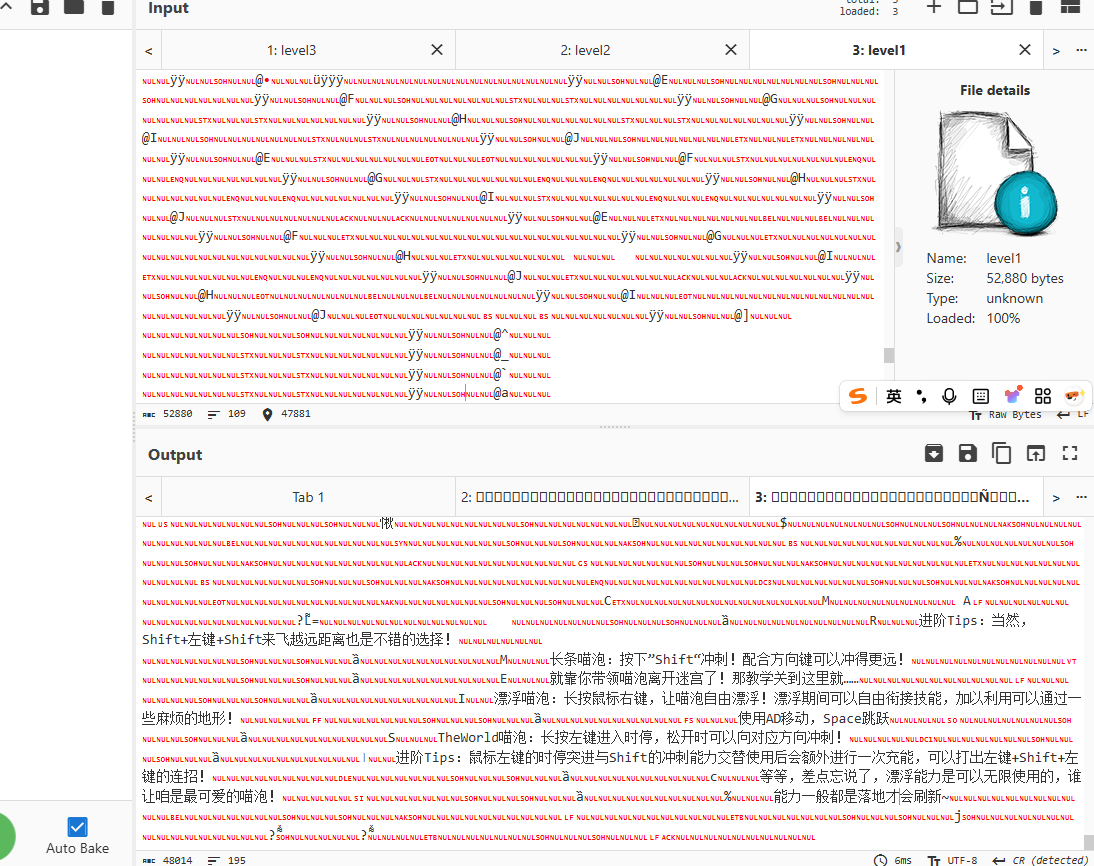
简单搜索后翻到了一个解析unity游戏数据的工具 https://assetripper.github.io/AssetRipper/articles/Downloads.html
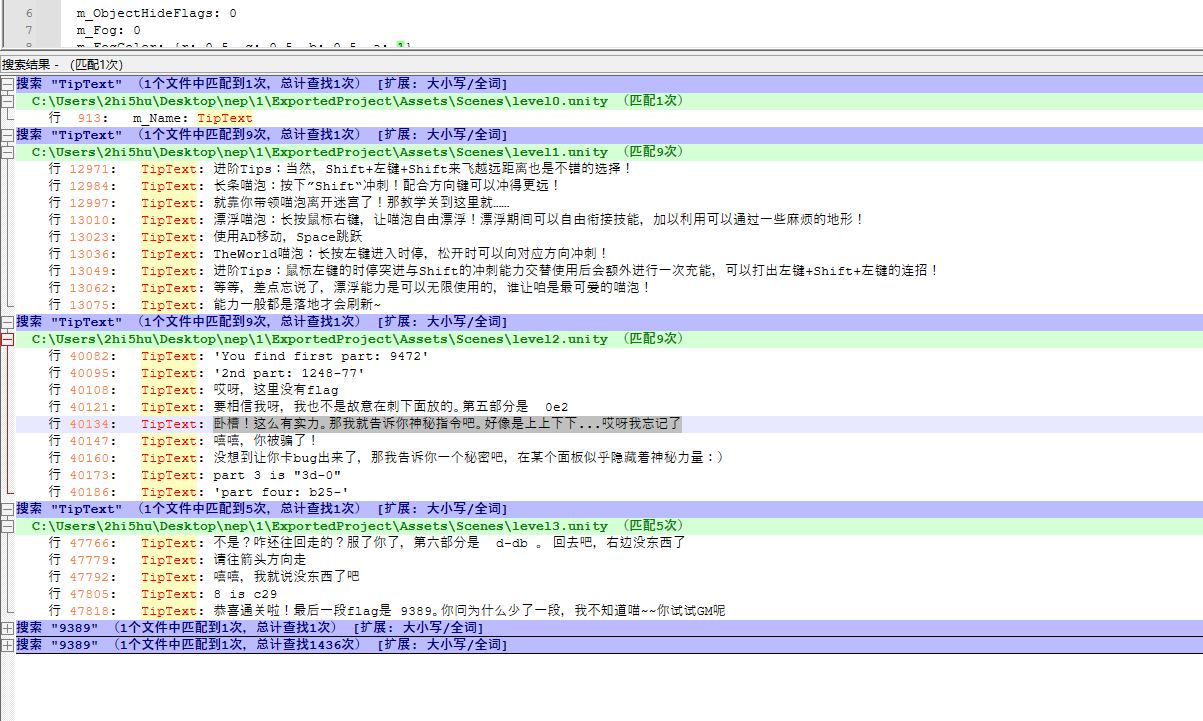
提取后爆搜发现了所有的面板提示 但是少了一个 根据提示应该要进gm
翻了翻里面的文件,找到了gm相关的代码 GmManager.cs 让ai分析一下可以知道切gm的方式是 上上下下左右左右ba
  1using System;
  2using System.Collections;
  3using System.Collections.Generic;
  4using System.Linq.Expressions;
  5using TMPro;
  6using UnityEngine;
  7
  8public sealed class GmManager : MonoBehaviour
  9{
 10	public enum KonamiKey
 11	{
 12		Up = 0,
 13		Down = 1,
 14		Left = 2,
 15		Right = 3,
 16		A = 4,
 17		B = 5
 18	}
 19
 20	private readonly struct GmResultLogger
 21	{
 22		private readonly TextMeshProUGUI resultText;
 23
 24		public GmResultLogger(TextMeshProUGUI resultText)
 25		{
 26			this.resultText = null;
 27		}
 28
 29		public void Log(string message)
 30		{
 31		}
 32
 33		public void Info(string message)
 34		{
 35		}
 36
 37		public void Error(string message)
 38		{
 39		}
 40
 41		public void Warning(string message)
 42		{
 43		}
 44	}
 45
 46	private class GmCommandRunner
 47	{
 48		public enum TokenType
 49		{
 50			Ident = 0,
 51			Expr = 1,
 52			Int = 2,
 53			Float = 3,
 54			String = 4,
 55			Bool = 5,
 56			Vector2 = 6,
 57			Vector3 = 7,
 58			List = 8
 59		}
 60
 61		public interface IToken
 62		{
 63			TokenType Type { get; }
 64
 65			string Text { get; }
 66
 67			object Value { get; }
 68		}
 69
 70		public interface IToken<T> : IToken
 71		{
 72			new T Value { get; }
 73		}
 74
 75		public readonly struct IdentToken : IToken<string>, IToken
 76		{
 77			public TokenType Type => default(TokenType);
 78
 79			public string Text { get; }
 80
 81			public string Value => null;
 82
 83			object IToken.Value => null;
 84
 85			public IdentToken(string text)
 86			{
 87				Text = null;
 88			}
 89		}
 90
 91		public struct ExprToken : IToken<Expression>, IToken
 92		{
 93			private Func<string> getValueText;
 94
 95			private Action<object> setValue;
 96
 97			public TokenType Type => default(TokenType);
 98
 99			public string Text => null;
100
101			public Expression Value { get; }
102
103			object IToken.Value => null;
104
105			public ExprToken(Expression member)
106			{
107				Value = null;
108				getValueText = null;
109				setValue = null;
110			}
111
112			public string GetText()
113			{
114				return null;
115			}
116
117			public void SetValue(IToken token)
118			{
119			}
120		}
121
122		public readonly struct IntToken : IToken<int>, IToken, IToken<float>
123		{
124			public TokenType Type => default(TokenType);
125
126			public string Text { get; }
127
128			public int Value { get; }
129
130			float IToken<float>.Value => 0f;
131
132			object IToken.Value => null;
133
134			public IntToken(int value)
135			{
136				Text = null;
137				Value = 0;
138			}
139		}
140
141		public readonly struct FloatToken : IToken<float>, IToken
142		{
143			public TokenType Type => default(TokenType);
144
145			public string Text { get; }
146
147			public float Value { get; }
148
149			object IToken.Value => null;
150
151			public FloatToken(float value)
152			{
153				Text = null;
154				Value = 0f;
155			}
156		}
157
158		public readonly struct StringToken : IToken<string>, IToken
159		{
160			public TokenType Type => default(TokenType);
161
162			public string Text { get; }
163
164			public string Value => null;
165
166			object IToken.Value => null;
167
168			public StringToken(string text)
169			{
170				Text = null;
171			}
172		}
173
174		public readonly struct BoolToken : IToken<bool>, IToken
175		{
176			public TokenType Type => default(TokenType);
177
178			public string Text { get; }
179
180			public bool Value { get; }
181
182			object IToken.Value => null;
183
184			public BoolToken(bool value)
185			{
186				Text = null;
187				Value = false;
188			}
189		}
190
191		public readonly struct Vector2Token : IToken<Vector2>, IToken
192		{
193			public TokenType Type => default(TokenType);
194
195			public string Text { get; }
196
197			public Vector2 Value { get; }
198
199			object IToken.Value => null;
200
201			public Vector2Token(Vector2 value)
202			{
203				Text = null;
204				Value = default(Vector2);
205			}
206		}
207
208		public readonly struct Vector3Token : IToken<Vector3>, IToken
209		{
210			public TokenType Type => default(TokenType);
211
212			public string Text { get; }
213
214			public Vector3 Value { get; }
215
216			object IToken.Value => null;
217
218			public Vector3Token(Vector3 value)
219			{
220				Text = null;
221				Value = default(Vector3);
222			}
223		}
224
225		public readonly struct ListToken : IToken<IList>, IToken
226		{
227			public TokenType Type => default(TokenType);
228
229			public string Text { get; }
230
231			public IList Value { get; }
232
233			object IToken.Value => null;
234
235			public ListToken(IList value)
236			{
237				Text = null;
238				Value = null;
239			}
240		}
241
242		private readonly GmResultLogger logger;
243
244		private readonly Dictionary<string, Action<GmResultLogger, IToken[]>> commandHandlers;
245
246		public GmCommandRunner(GmResultLogger logger)
247		{
248		}
249
250		public void RegisterCommand(string command, Action<GmResultLogger, IToken[]> handler)
251		{
252		}
253
254		private void HelpHandler(GmResultLogger logger, IToken[] args)
255		{
256		}
257
258		private void DebugHandler(GmResultLogger logger, IToken[] args)
259		{
260		}
261
262		private void SetHandler(GmResultLogger logger, IToken[] args)
263		{
264		}
265
266		private void EnableSuperHandler(GmResultLogger logger, IToken[] args)
267		{
268		}
269
270		private void GetFlagHandler(GmResultLogger logger, IToken[] args)
271		{
272		}
273
274		private void InitHandlers()
275		{
276		}
277
278		public void Run(string command)
279		{
280		}
281
282		public static void SplitTokens(string command, out IToken[] tokens)
283		{
284			tokens = null;
285		}
286	}
287
288	public bool IsUseGm;
289
290	private readonly KonamiKey[] sequence;
291
292	private int currentIndex;
293
294	private float lastInputTime;
295
296	public float sequenceTimeout;
297
298	public GameObject gmPanel;
299
300	public TMP_InputField gmCommandText;
301
302	public TextMeshProUGUI resultText;
303
304	private GmCommandRunner runner;
305
306	private void Update()
307	{
308	}
309
310	public void ExitGmMode()
311	{
312	}
313
314	private void CheckEnterGmMode()
315	{
316	}
317
318	private bool CheckKeyDown(KonamiKey targetKey, KeyCode keyCode)
319	{
320		return false;
321	}
322
323	private void OnKonamiCodeActivated()
324	{
325	}
326
327	private void RunGmCommand(string command)
328	{
329	}
330}
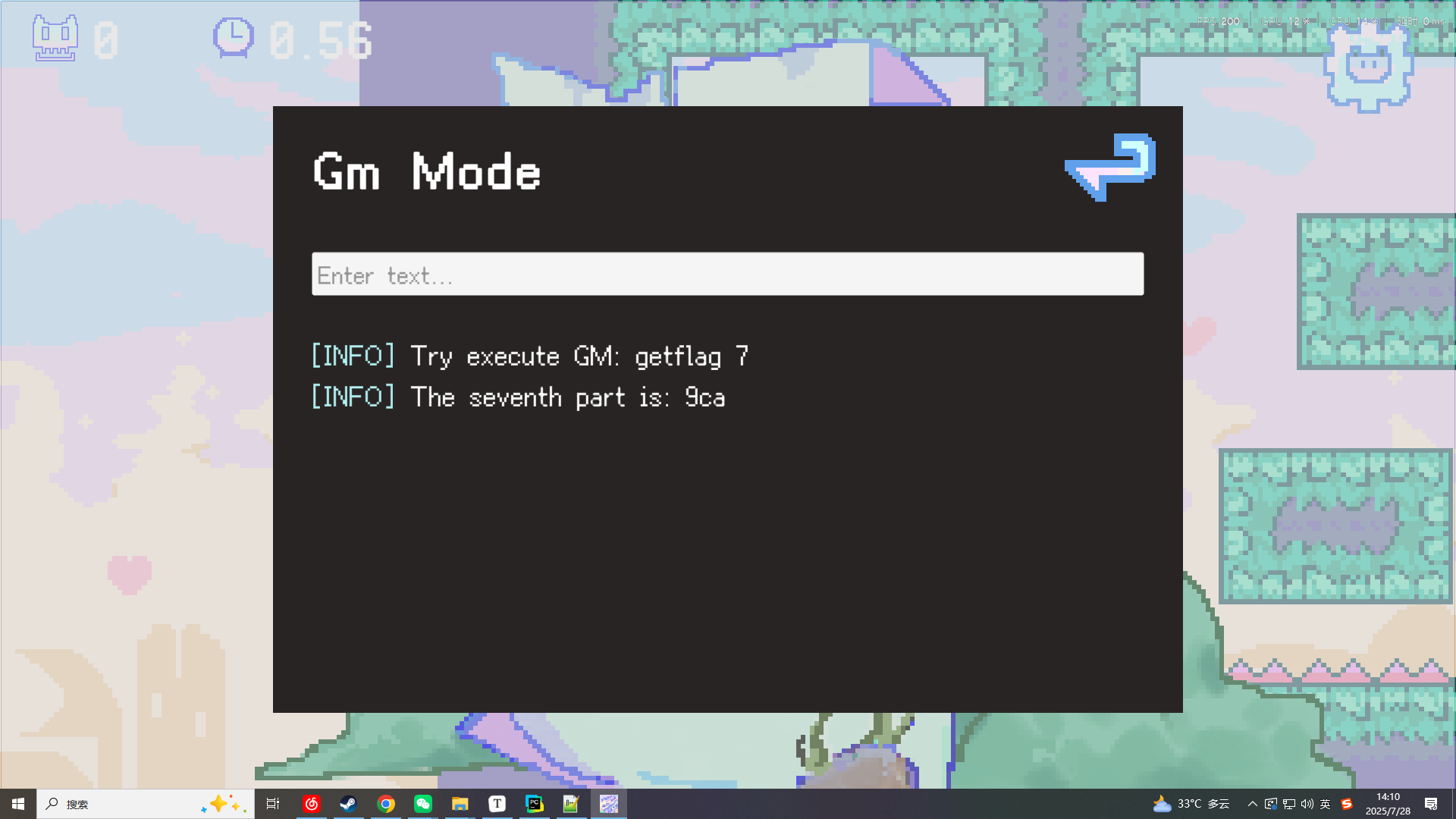
经过尝试后 发现是要在游戏过程中的设置页面里操作即可打开gm面板 help后发现有getflag的方法
输入getflag 7 得到最后缺少的部分
easyshock
知识点省流
不懂 说是故障注入 但是爆破
WP
不是特别懂 但可以让ai梭哈
根据题目信息以及ai对附件的分析 好像是要得到一个准确的shocktime 让寄存器进行一个随机翻转
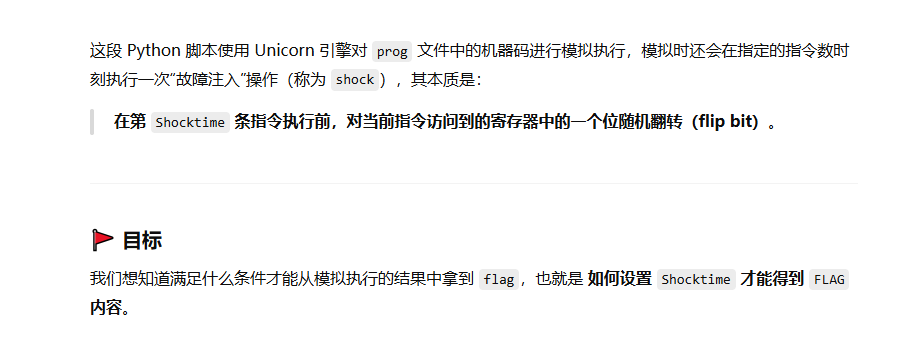
不是很懂 但可以进行爆破,稍微把范围开大点,然后让他慢慢爆破并且记录 shock成功的次数,以防万一存在偶然性
  1import os
  2import random
  3from Crypto.Cipher import ARC4
  4from unicorn import *
  5from unicorn.x86_const import *
  6from capstone import *
  7from capstone.x86_const import *
  8
  9# ==== 基础参数 ====
 10FLAG = b'test{dummy_flag}'
 11CODE_COUNT = 0
 12TARGET_COUNT = 0
 13
 14CODE_ADDRESS    = 0x110000
 15DATA_ADDRESS    = 0x220000
 16OUTPUT_ADDRESS  = 0x330000
 17KEY_ADDRESS     = 0x440000
 18STACK_ADDRESS   = 0x880000
 19
 20with open("prog", "rb") as f:
 21    CODE = f.read()
 22
 23ENTRY_POINT = CODE_ADDRESS
 24ENTRY_POINT_END = CODE_ADDRESS + 0x296
 25
 26# ==== 模拟核心 ====
 27def flipBit(uc: Uc, reg_name: str):
 28    randBit = random.randint(0, 7)
 29    reg_num = eval("UC_X86_REG_" + reg_name.upper())
 30    reg_value = uc.reg_read(reg_num)
 31    reg_value ^= 1 << randBit
 32    uc.reg_write(reg_num, reg_value)
 33
 34def shock(uc: Uc):
 35    rip = uc.reg_read(UC_X86_REG_RIP)
 36    code = uc.mem_read(rip, 16)
 37    md = Cs(CS_ARCH_X86, CS_MODE_64)
 38    md.detail = True
 39    dis = next(md.disasm(code, 0), None)
 40    if dis:
 41        for reg_list in dis.regs_access():
 42            for reg in reg_list:
 43                flipBit(uc, md.reg_name(reg))
 44
 45def hook_code(uc: Uc, address, size, user_data):
 46    global CODE_COUNT
 47    if CODE_COUNT >= 200000:
 48        uc.emu_stop()
 49    if CODE_COUNT == TARGET_COUNT:
 50        shock(uc)
 51    CODE_COUNT += 1
 52
 53def emulate(cipher, key, target):
 54    global CODE_COUNT, TARGET_COUNT
 55    CODE_COUNT = 0
 56    TARGET_COUNT = target
 57
 58    mu = Uc(UC_ARCH_X86, UC_MODE_64)
 59    mu.mem_map(CODE_ADDRESS, 0x1000)
 60    mu.mem_map(DATA_ADDRESS, 0x1000)
 61    mu.mem_map(OUTPUT_ADDRESS, 0x1000)
 62    mu.mem_map(KEY_ADDRESS, 0x1000)
 63    mu.mem_map(STACK_ADDRESS, 0x2000)
 64
 65    mu.mem_write(CODE_ADDRESS, CODE)
 66    mu.mem_write(DATA_ADDRESS, cipher)
 67    mu.mem_write(KEY_ADDRESS, key)
 68
 69    mu.reg_write(UC_X86_REG_RIP, ENTRY_POINT)
 70    mu.reg_write(UC_X86_REG_RDI, DATA_ADDRESS)
 71    mu.reg_write(UC_X86_REG_RSI, KEY_ADDRESS)
 72    mu.reg_write(UC_X86_REG_RDX, OUTPUT_ADDRESS)
 73    mu.reg_write(UC_X86_REG_RSP, STACK_ADDRESS + 0x1000)
 74
 75    mu.hook_add(UC_HOOK_CODE, hook_code)
 76
 77    try:
 78        mu.emu_start(ENTRY_POINT, ENTRY_POINT_END)
 79        result = mu.mem_read(OUTPUT_ADDRESS, 512)
 80        return result
 81    except:
 82        return b''
 83
 84# ==== 构造密文 ====
 85def generate_cipher():
 86    text = open("text.txt", "rb").read() + FLAG + b'\n'
 87    key = os.urandom(16)
 88    cipher = ARC4.ARC4Cipher(key).encrypt(text)
 89    return cipher, key
 90
 91# ==== 本地爆破 ====
 92if __name__ == '__main__':
 93    cipher, key = generate_cipher()
 94    successes = []
 95
 96    for shocktime in range(1, 100000):
 97        if shocktime % 2000 == 0:
 98            print(f"[*] Testing shocktime = {shocktime}")
 99        found = False
100        for _ in range(10):  # 每个点尝试 10 次
101            result = emulate(cipher, key, shocktime)
102            if FLAG in result:
103                print(f"[!!] HIT shocktime = {shocktime}")
104                successes.append(shocktime)
105                found = True
106                break
107        # 不停止,继续下一个 shocktime
108
109    print("\n=== 爆破完成 ===")
110    print("成功的 shocktime 列表:", successes)
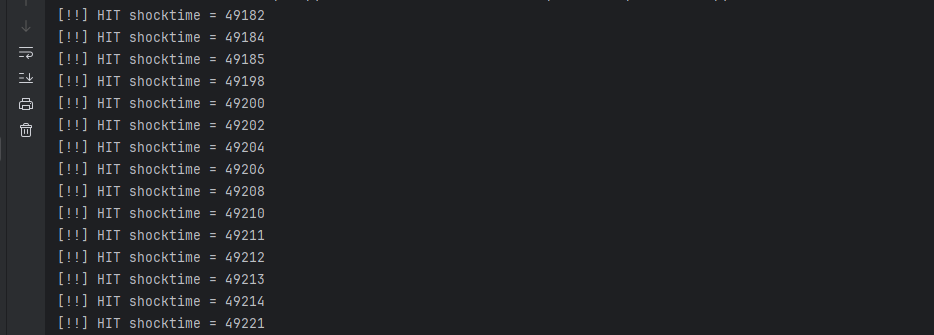
嗯爆还是可以爆出东西的
再来个提交脚本 挑个shocktime试试
 1import socket
 2import ssl
 3
 4# 靶场地址和端口
 5HOST = 'nepctf31-qayq-xg28-m9l3-cvbc6vzim342.nepctf.com'
 6PORT = 443
 7
 8# 要发送的 shocktime
 9SHOCKTIME = 49202
10
11# 建立 SSL 连接并发送 shocktime
12with socket.create_connection((HOST, PORT), timeout=10) as raw_sock:
13    ctx = ssl.create_default_context()
14    conn = ctx.wrap_socket(raw_sock, server_hostname=HOST)
15
16    # 读取直到提示出现
17    prompt = b''
18    while b'time to shock:' not in prompt:
19        chunk = conn.recv(1024)
20        if not chunk:
21            break
22        prompt += chunk
23    print(prompt.decode(errors='ignore'), end='')
24
25    # 发送 shocktime
26    conn.sendall(f"{SHOCKTIME}\n".encode())
27
28    # 读取并打印服务器响应
29    response = b''
30    conn.settimeout(5)
31    try:
32        while True:
33            data = conn.recv(4096)
34            if not data:
35                break
36            response += data
37    except socket.timeout:
38        pass
39
40    print(response.decode(errors='ignore'))
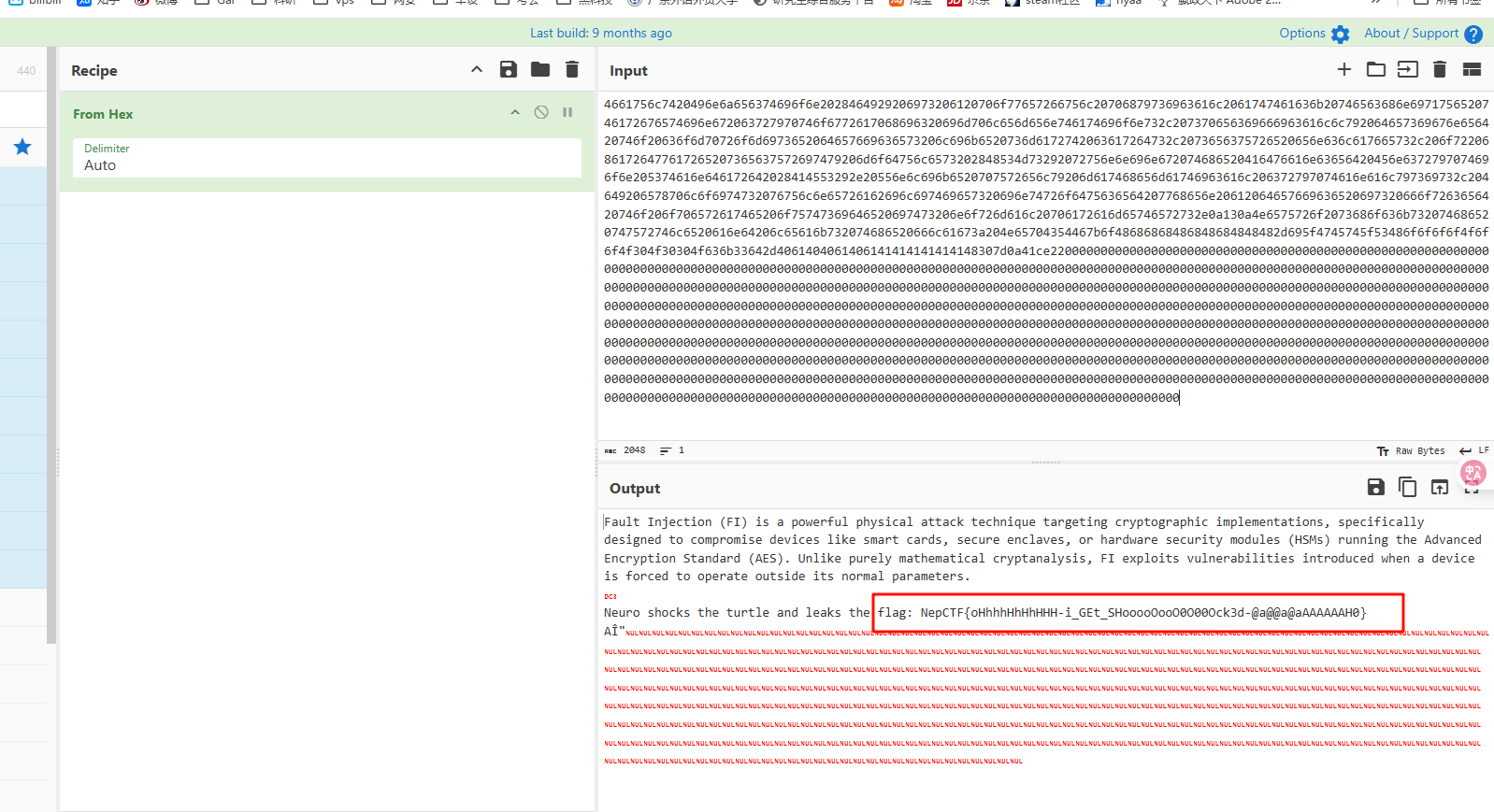
丢给厨子处理一下得到的数据就得到flag了
Comments will be available soon.